A local server cockpit

Your servers,
on a shelf you own.

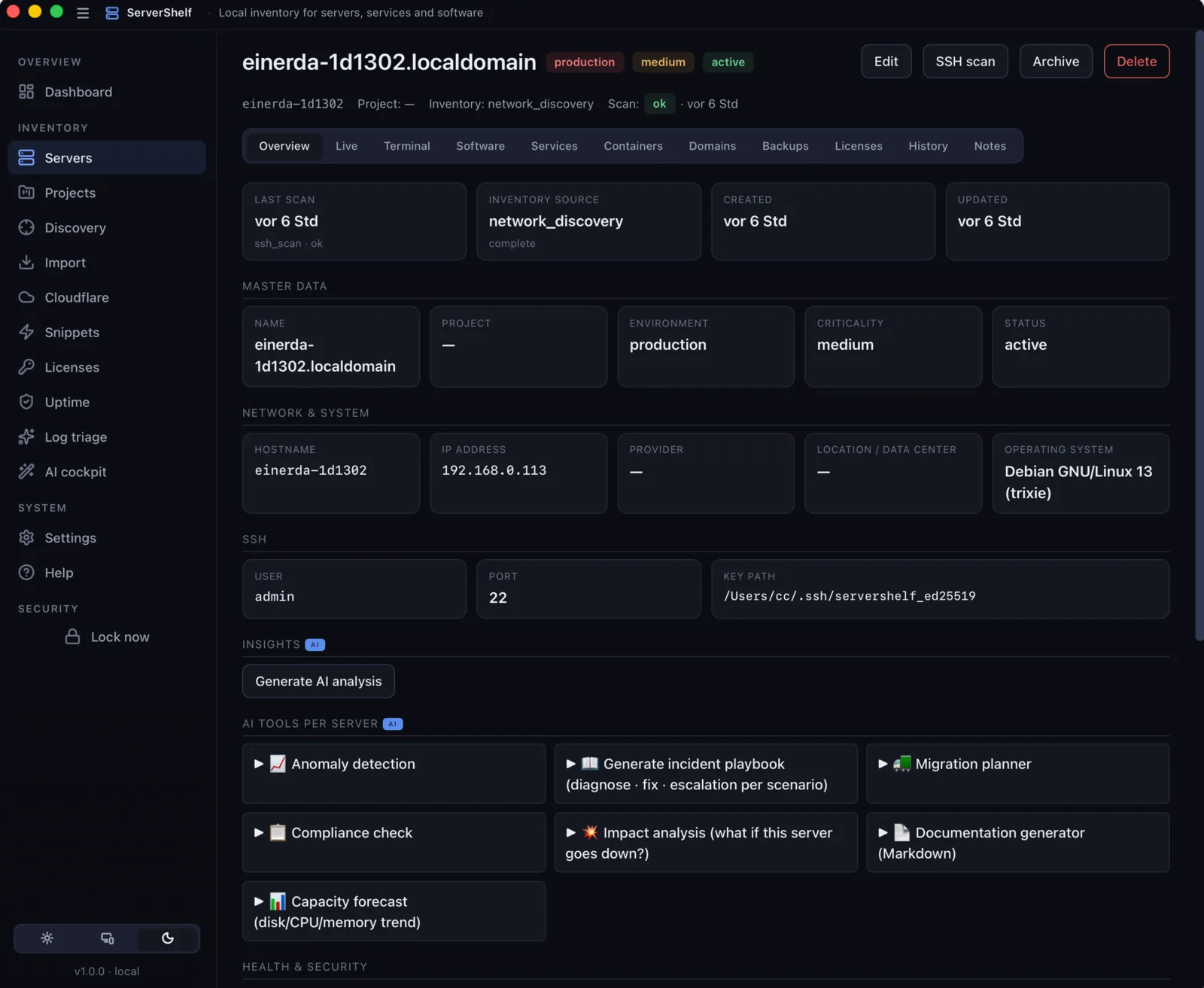
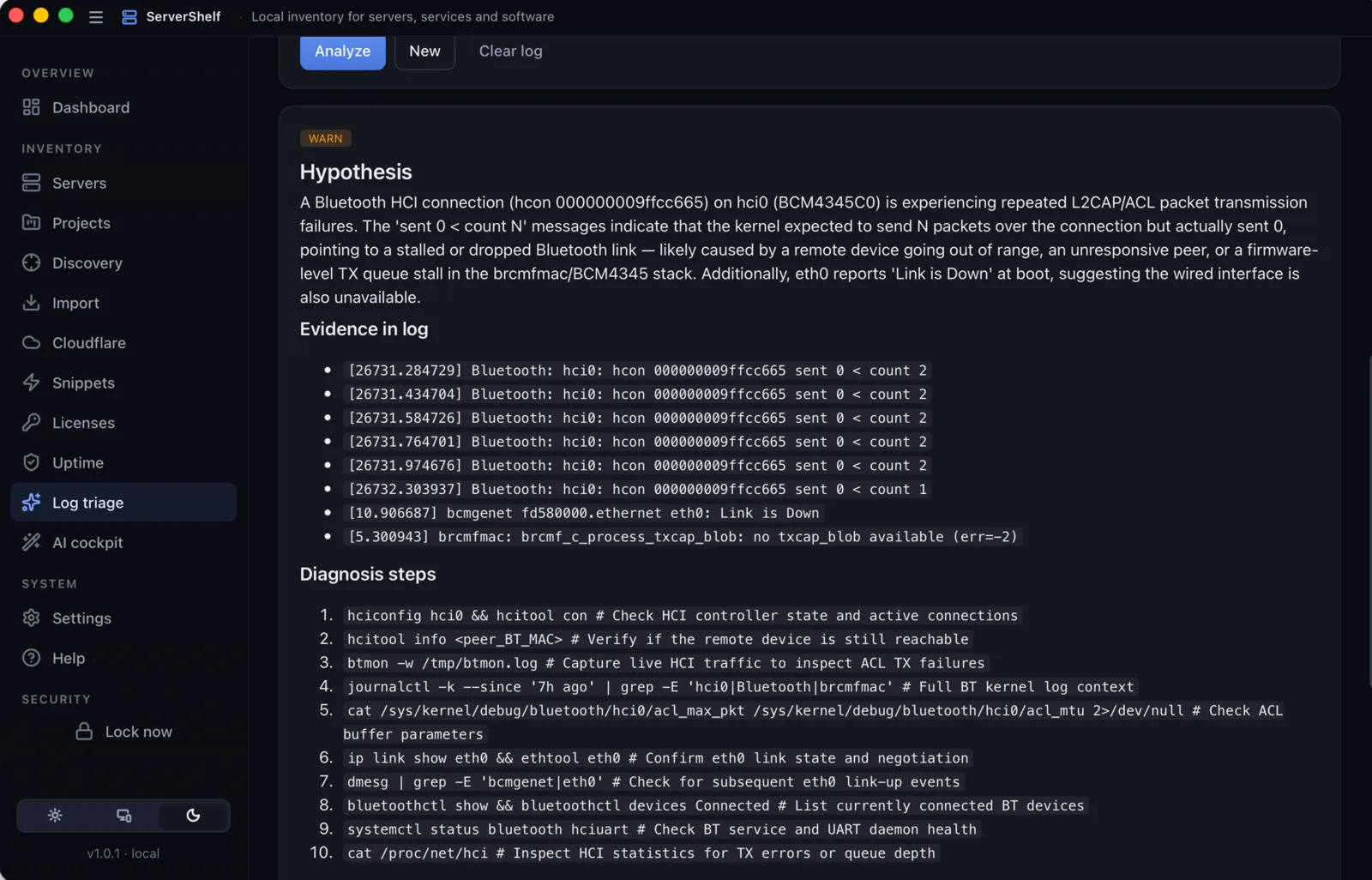
A complete server inventory and SSH management tool for Mac: clear fleet overview, one-click import from 12 cloud providers, and AI log triage that auto-fetches journalctl, syslog and nginx logs over SSH and turns them into a probable root cause. No agent on the host. No cloud account. No telemetry.

📡 SSH-based 🖥 Linux · macOS · Windows targets 🛡 SQLCipher-encrypted vault

macOS 12+ (Apple Silicon, signed + notarized) · Windows & Linux builds on the v1.1 roadmap

ServerShelf is not your terminal.
It's your local server cockpit.

For people who run several servers and want to see, fast: what's running where, what's critical, what changed.

Why ServerShelf exists

It started with a server I shouldn't have reset.

One afternoon I reset a cloud VPS — and wiped an n8n instance I'd completely forgotten was running on it. It was quietly powering automation agents for a system people still depended on. Gone, with a single command.

So I did what everyone does: I opened a spreadsheet. Dev, staging, prod — every server, with its databases, web servers and the apps running on each. Finally, an overview.

Within a week the spreadsheet was already out of date. The real problem was never the missing list — it was having to keep it by hand. So I built the thing that fills itself in: connect over SSH, scan, and the inventory is simply there. That became ServerShelf.

— Christof, builder of ServerShelf

Features

Everything in one place.

Three things stand out: a single overview of your fleet, automated import from twelve cloud providers, and AI log triage that points at the probable cause. Everything else builds on those three.

🩺

AI log triage

Pick a server, pick a source (journalctl, syslog, auth.log, nginx, Apache, dmesg, Docker) — ServerShelf auto-fetches the last N lines via SSH, then sends them to your own AI key. You get a probable root cause, ranked next steps, and a suggested fix. Manual paste still works for logs from anywhere else.

📥

One-click provider import

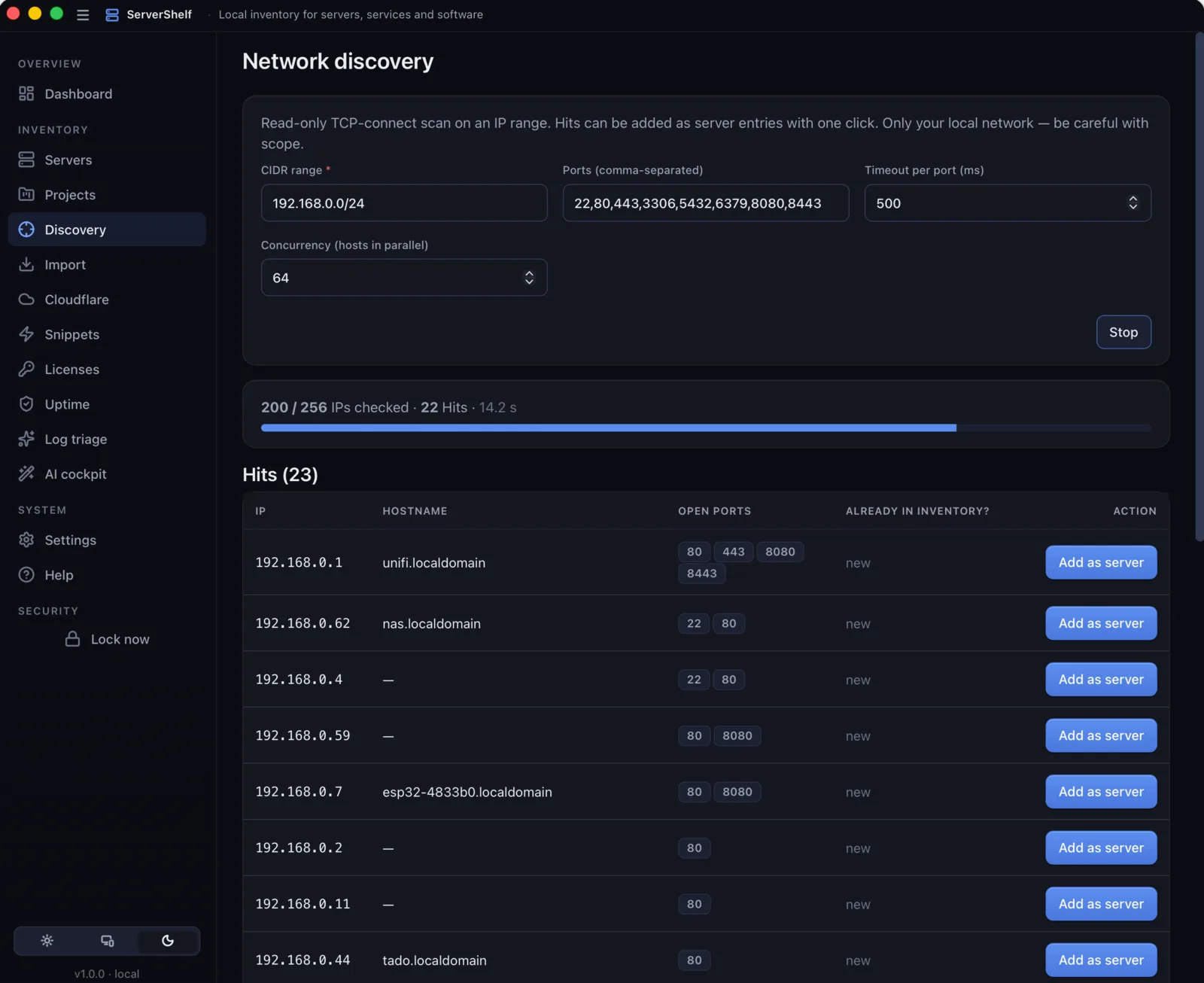
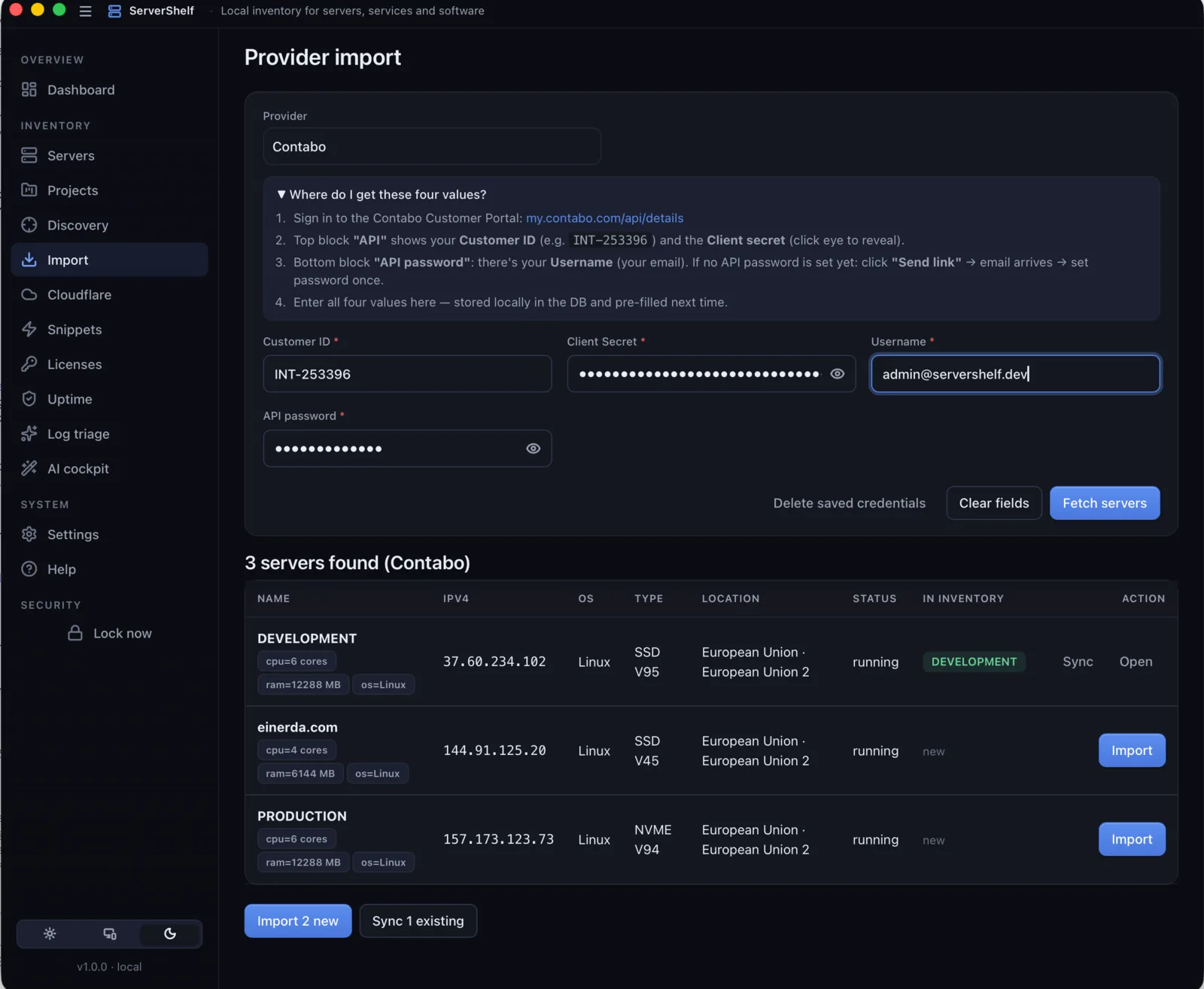
Twelve providers in one place: Hetzner, AWS, DigitalOcean, Contabo, Vultr, Linode, Scaleway, IONOS, OVHcloud, Proxmox, Kubernetes, VMware vSphere. Re-sync at any time — your notes, tags and projects stay intact.

🗂

Fleet overview at a glance

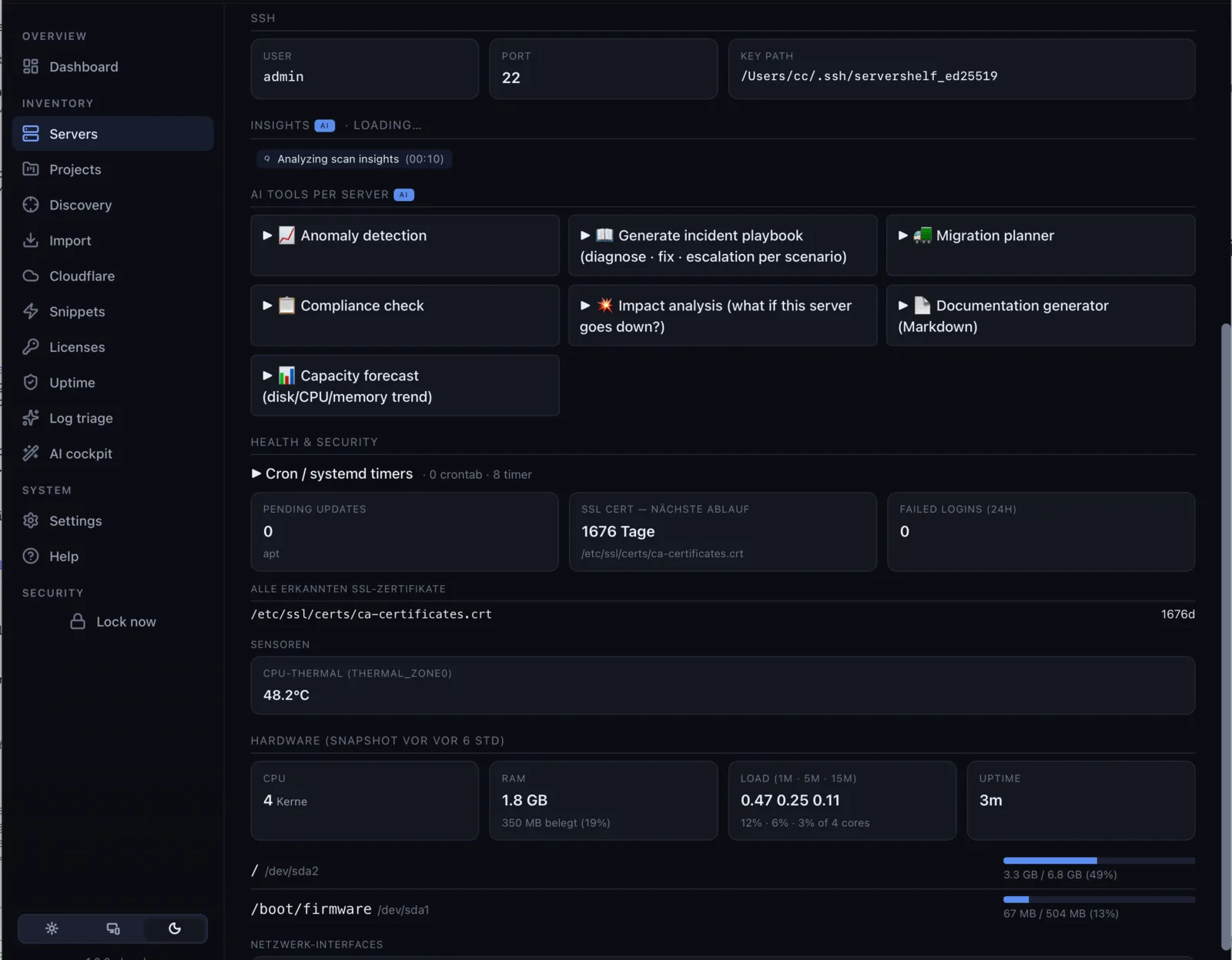
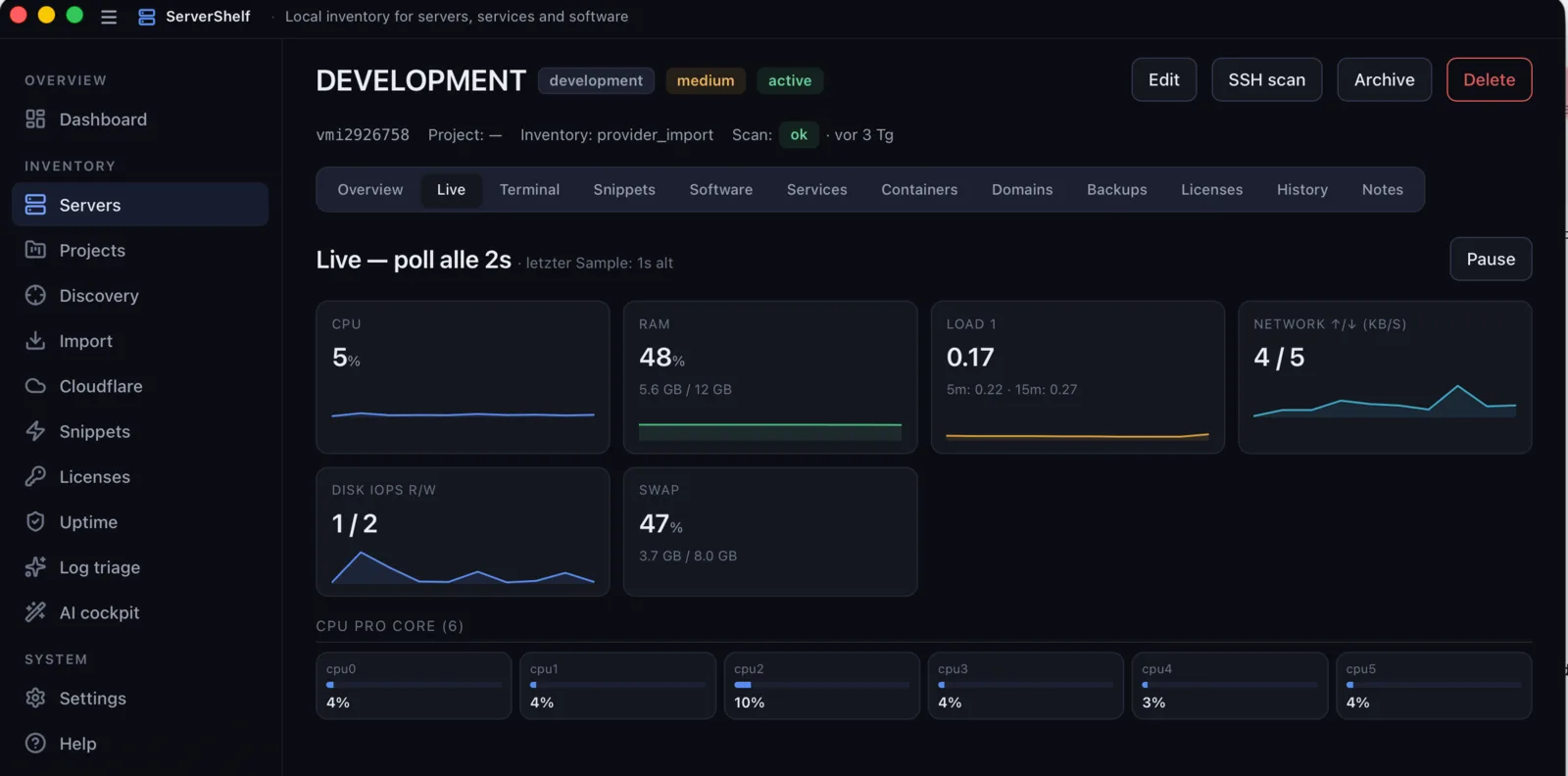
Every server, every project, every tag — one window. Pending updates, SSL expiry, uptime status, SMART warnings. Click a tile to drill in. Snooze what you can't act on right now.

🔍

Agentless cross-OS scans

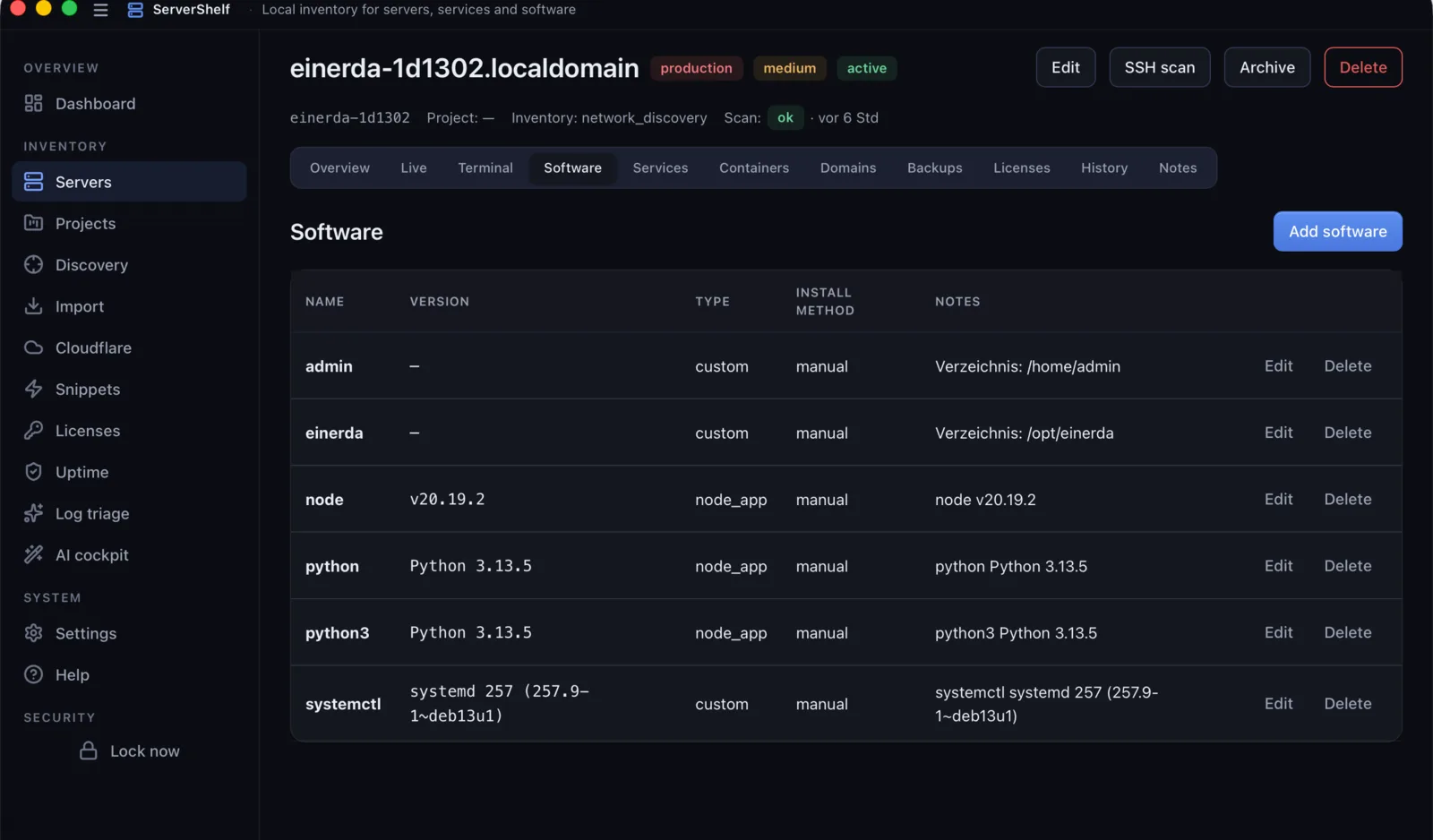
One click, plain SSH (key or password). ServerShelf detects the target OS and runs the right probe: Linux reads dpkg/rpm/apk, systemctl, journalctl; macOS uses brew, launchctl, sw_vers; Windows uses PowerShell with Get-CimInstance, Get-Service, Get-NetTCPConnection. About six seconds per server. Nothing is installed, nothing changes on the host.

🌐

Real TLS certificate monitoring

Every six hours, ServerShelf opens an actual TLS handshake to domain:443 and parses the certificate (issuer, SAN list, validity window). It warns 30 days before expiry and handles self-signed, expired, and wildcard SANs.

📦

Software & license vault

Per server: installed packages, versions and install method. Software-license keys (Mailgun, Sentry, Adobe and friends) live in an AES-256-GCM vault with seats, vendor, renewal date and cost. Reveal on demand.

🐳

Remote Docker control

Start, stop, restart, remove and create containers on the host's Docker engine, all over SSH. Stream logs live. Works on any server with docker installed — your laptop does not need Docker.

HTTP uptime checks

Configurable polling intervals (from 60 s upward), status history, latency tracking. Marks each target DOWN / SLOW / OK. Failures surface in the Triage view. Local-only — no external monitoring service involved.

💻

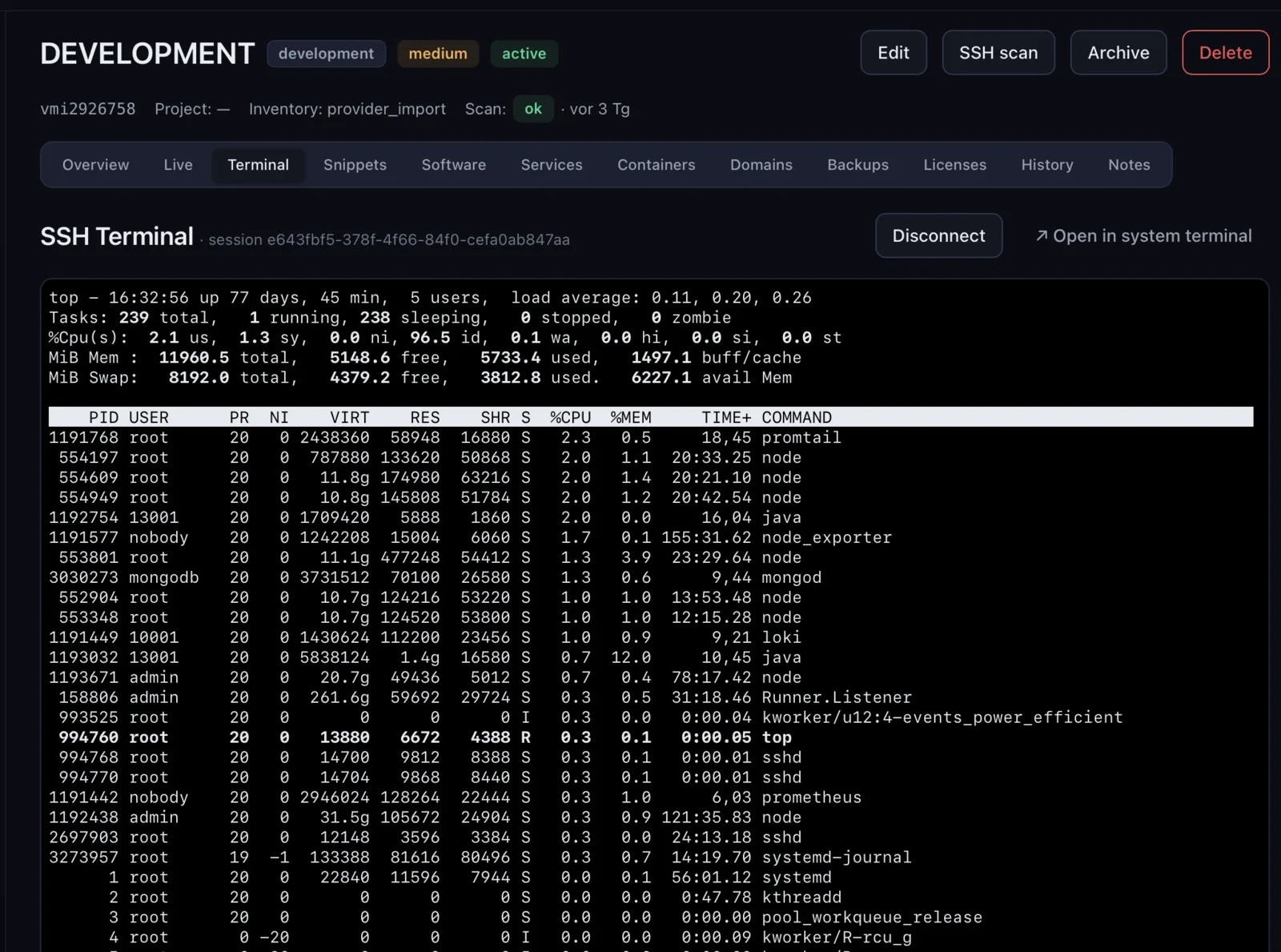
Built-in PTY terminal

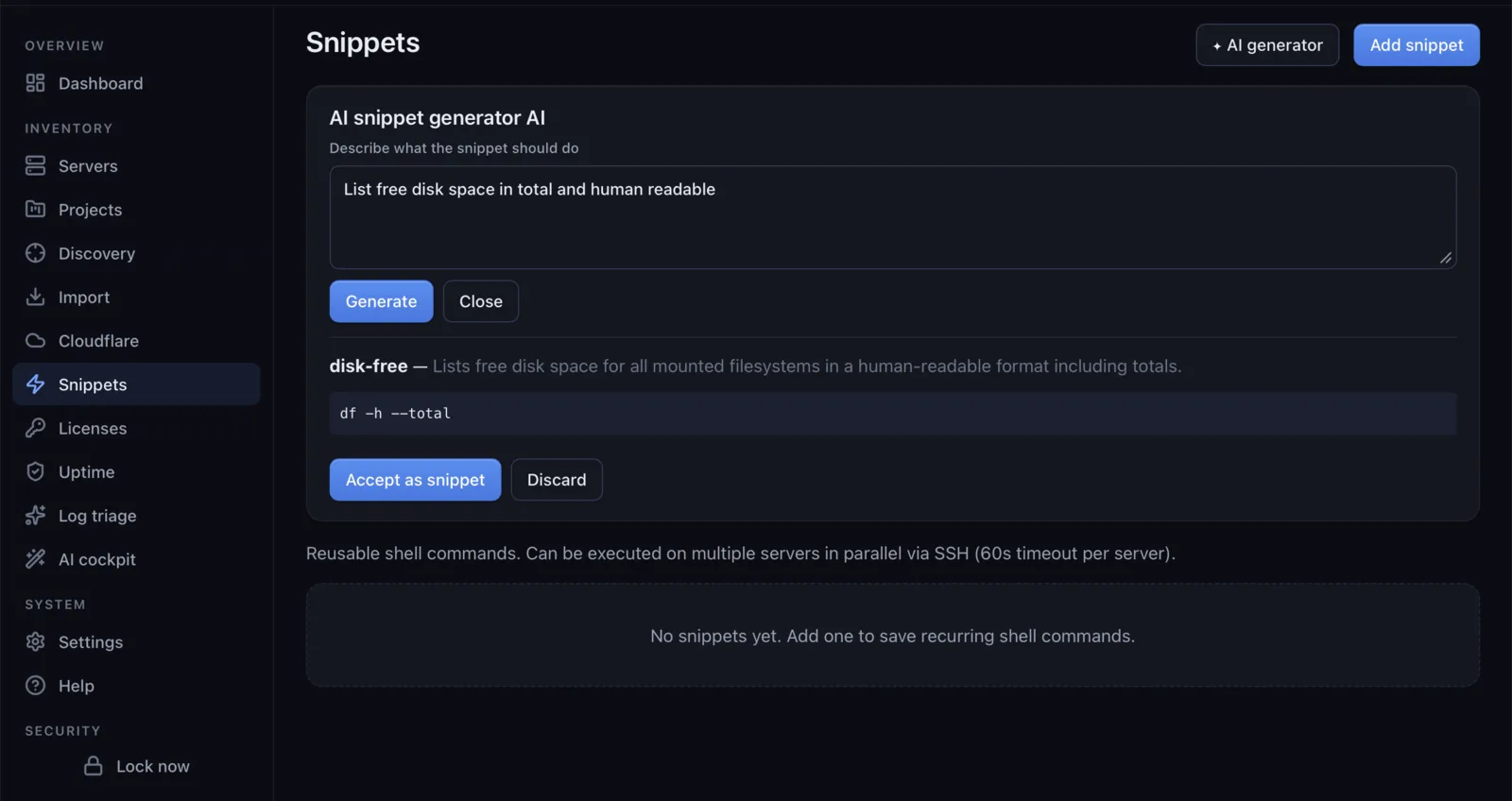
A real PTY-backed SSH terminal per server: resize, ANSI colors, scrollback. A snippet library you can run with one click. An SSH-key deployment helper for first-time setup.

🔐

Encrypted backups & cloud sync

Export the full inventory to one AES-256-GCM file (Argon2id KDF, 64 MiB / 3 iter). Cloud sync ships the same blob to your iCloud Drive, S3 bucket or WebDAV folder — end-to-end encrypted, no one but you holds the key.

Auto-lock & biometric quick-unlock

A configurable idle timer locks the vault automatically. Optional Touch ID / Windows Hello quick-unlock via the OS keychain — the passphrase never leaves disk and is never reused. Lock manually with one click in the sidebar.

📜

Append-only audit log

Every destructive or credential-touching action (server delete, container kill, snippet on remote, AI prompt) lands in the audit log with timestamp, target, duration and outcome. SQLite triggers block UPDATE and DELETE — the log is forensic-grade.

AI Cockpit

An AI that
actually knows your fleet.

Ask plain-language questions about any of your servers. Paste a log excerpt and get a probable root cause. Generate shell snippets from a description. Read a daily briefing of what changed across the fleet, spot anomalies in metrics, review nginx, sshd and fail2ban configs, sketch architecture diagrams, plan migrations, forecast capacity. Twenty-plus AI workflows, all reading straight from your local inventory.

  • Chat with your inventory · daily briefing · anomaly detection
  • Log triage · config review · remediation · architecture diagrams
  • Snippet generation · runbooks · migration plans
  • Impact analysis · capacity forecast · cost optimization
  • License & EOL audit · documentation generator · notification digest
  • Cross-pattern detection · naming decoder · compliance checks

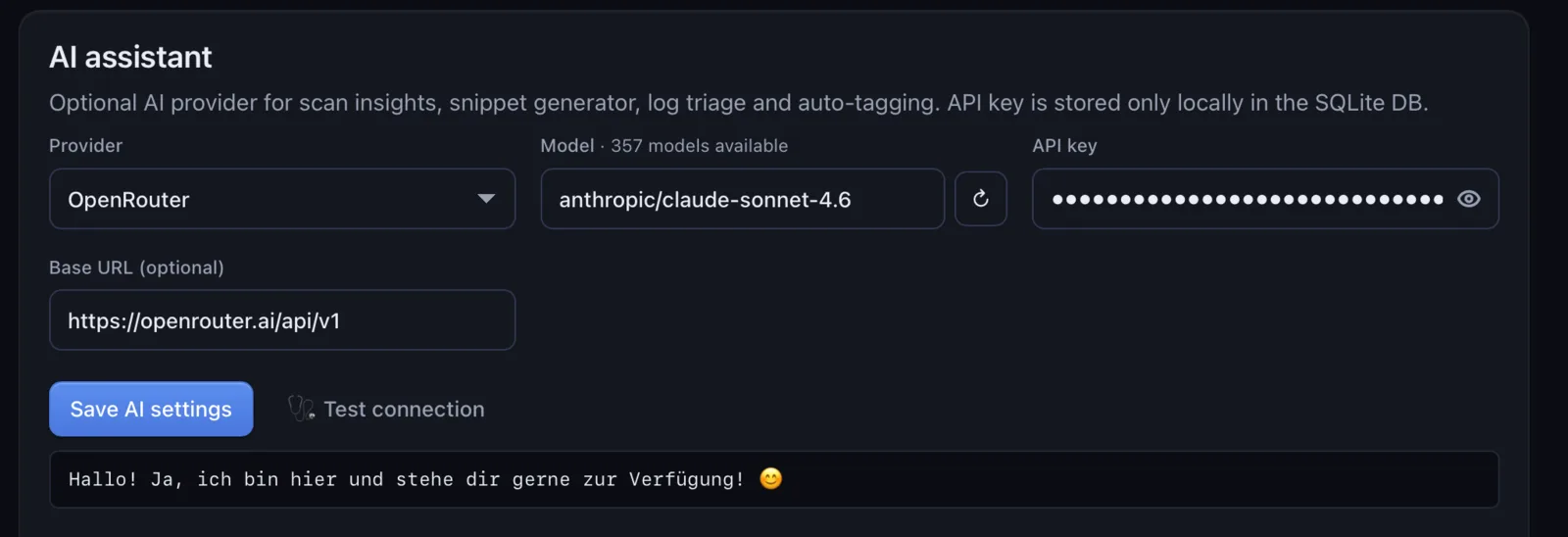
Bring your own key. Your prompts never touch our servers — they go directly from your machine to the AI provider you picked.

Supported AI providers

Anthropic Claude · you provide the API key
OpenAI GPT-4 / GPT-5 · you provide the API key
OpenRouter 300+ models · you provide the API key
Mistral EU-hosted · you provide the API key
Groq Fast inference · you provide the API key
Google Gemini Gemini 1.5 / 2 · you provide the API key
Ollama Fully local · no API key, no network

No vendor lock-in. Switch providers in Settings → AI any time.

Security by default

Six lines of defence — every install.

Server data is sensitive. ServerShelf treats it that way: nothing leaves your devices, every secret is encrypted at rest, and every privileged action is logged.

SQLCipher AES-256 database

Your entire inventory lives in one SQLite file — but every page is encrypted with AES-256. The DB cannot be opened with a regular SQLite browser.

Argon2id master passphrase

Your passphrase is stretched through Argon2id (64 MiB, 3 iterations) before it can unlock the DB key. Brute-force becomes economically pointless.

Offline ed25519 license check

Your license is verified locally with an ed25519 signature. No license server, no online check, no telemetry — even after a year of updates.

Append-only audit log

Every destructive or credential-touching action is logged. SQLite triggers block UPDATE and DELETE on the log — the trail is forensic-grade.

No telemetry. Ever.

No analytics, no phone-home, no anonymous metrics. Crash reports are opt-in and only enabled if you wire up your own Sentry DSN.

No cloud account required

You buy the app and it runs. No sign-up, no account, no email verification. Cloud sync is optional and ships an encrypted blob to a bucket you own.

12 providers, one inventory

Bring every server you own.

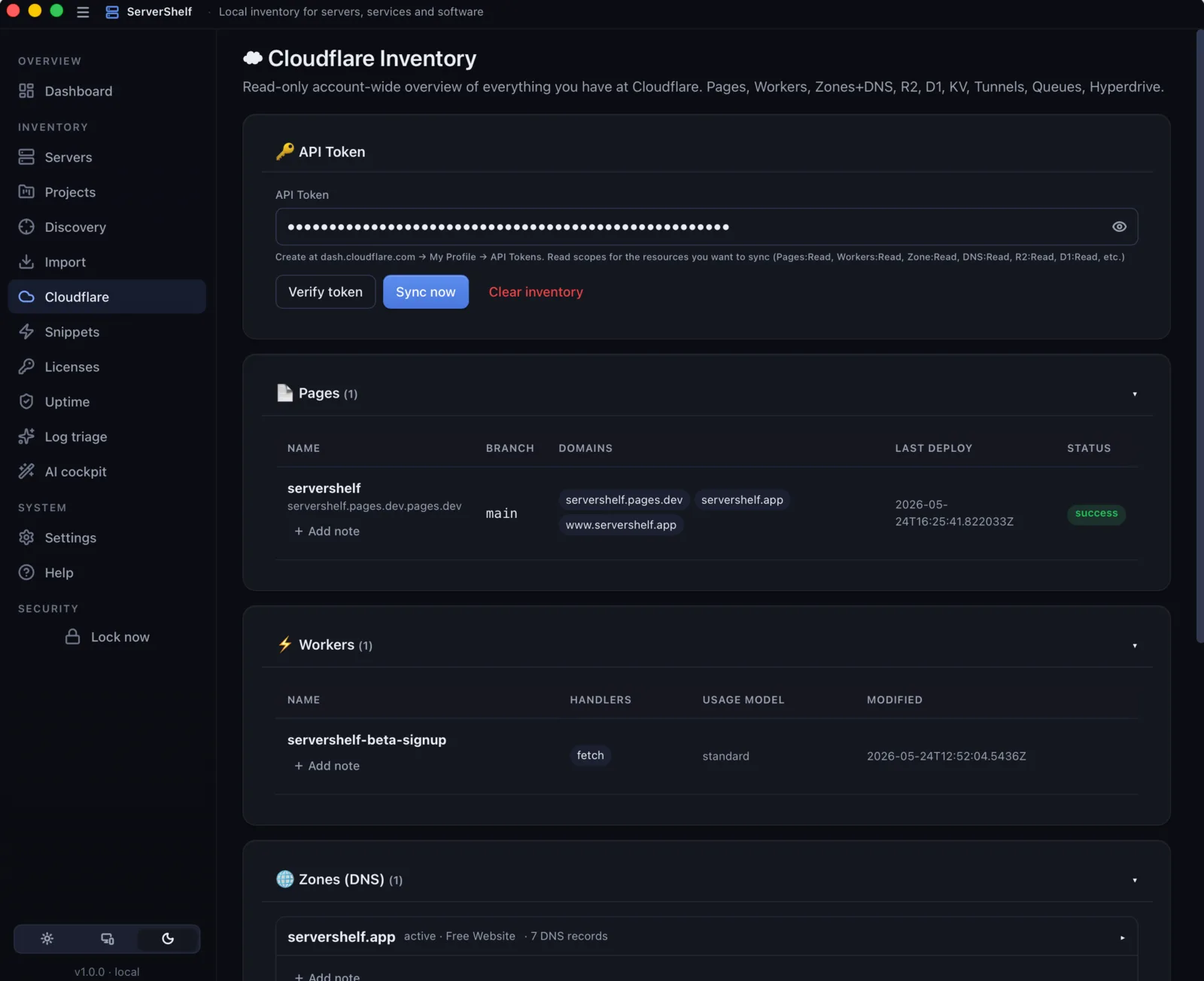
Import existing servers from your cloud account in one click — IP, OS, location and status come along. Re-sync at any time. Manual entries for bare metal, homelab boxes and Raspberry Pis are welcome too.

Hetzner
AWS
DigitalOcean
Contabo
Vultr
Linode
Scaleway
IONOS
OVHcloud
Proxmox
Kubernetes
VMware vSphere

Coming soon

iOS & Android companion.

A small, read-mostly companion to the desktop app. Glance at your fleet from the couch, get a push notification when uptime drops, triage from the train. No release date yet — we'll ship when it's solid.

  • Glance dashboard — server counts, expiring certs, current down/up status.
  • Push notifications — uptime drops, SSL nearing expiry, license renewals.
  • Quick triage — snooze, acknowledge or jump to a server from the lock screen.
  • Read-mostly — destructive actions stay on the desktop where you have the full context.
  • End-to-end encrypted — pairs with the desktop via QR over LAN or via your iCloud / S3 / WebDAV folder.

In development Want a heads-up when the apps land? Email us.

Talk to us

Bug, feature wish, or sales question?

We read every message and usually reply within a working day. For technical bugs the in-app Help → Send feedback dialog ships extra context automatically. Otherwise, this form:

Or email [email protected] directly.

Frequently asked

Questions, answered.

Where is my data stored?

In one SQLite file in your OS app-data directory, AES-256 page-encrypted with SQLCipher. Optional cloud sync uploads an opaque, end-to-end-encrypted blob to your own iCloud Drive, S3 bucket or WebDAV folder — we never see it.

What does ServerShelf send over the network?

SSH connections to the servers you add. HTTPS to the AI provider you picked, but only when you trigger an AI action. HTTPS to your cloud providers when you run an import. That's the complete list. No analytics, no phone-home, no telemetry.

Do I need an agent on each server?

No. ServerShelf uses plain SSH with your existing key pair (or password). Scans are read-only commands — uname, dpkg, systemctl, docker ps and friends. Nothing is installed on the host.

Can I bring my own AI key?

Yes — that's the only way. Drop in your Anthropic / OpenAI / OpenRouter / Mistral / Groq / Gemini key, or run Ollama locally for fully offline AI. We don't host any model — your prompts always go directly from your machine to your chosen provider.

Which AI providers are supported?

All seven, side by side: Anthropic (Claude), OpenAI (GPT-4 / GPT-5), OpenRouter (gateway to 300+ models), Mistral (EU-hosted), Groq (fast inference), Google Gemini, and Ollama (fully local — no API key, no network). Switch any time in Settings → AI.

How many devices can I install on?

Personal: 1 user, unlimited devices. Team: 6 users, unlimited devices each. The license is per user, not per machine.

What happens after 1 year of updates?

You keep the version you have, forever. No bricking, no nag screens, no offline-mode penalty. To get further updates, renew at 50 % of the then-current price.

Refund policy?

14 days, money-back, no questions asked. Email [email protected] from the address you bought with.

Linux / Windows support?

v1.0 ships macOS 12+ only (Apple Silicon, signed + notarized). Windows 11 and Linux (Ubuntu, Fedora, Arch) builds are on the roadmap for v1.1. The app already scans Linux, macOS and Windows targets — only the client app itself is currently macOS-only.

Local-first by design

Your data never leaves your devices.

🗄 SQLCipher-encrypted database

Your entire inventory lives in a single file in your app-data directory — page-level AES-256 encrypted via SQLCipher. The database key is sealed with your master passphrase (Argon2id) plus a one-time recovery code. Even physical access to the file is useless without one of the two.

🔐 End-to-end encrypted sync

Cloud sync derives an Argon2id key from your passphrase, then AES-256-GCM-encrypts the snapshot. Apple, Hetzner, or whoever runs your Nextcloud sees only an opaque blob.

🚫 Zero telemetry by default

No analytics, no phone-home, no "anonymous metrics". Crash reports are opt-in and only ever route through Sentry if you provide your own DSN.

🔑 Bring your own AI keys

Your AI provider keys stay on your machine. Prompts go directly from your app to your chosen provider. We never see them, and we host no model of our own.

Pricing

Buy once. Own forever.

Introductory pricing — early-adopter discount, prices rise after launch

Pay once. No subscription. iOS & Android companion apps included when they ship. AI works with your own provider key — no extra cost, no monthly bill, no vendor lock-in.

Before you buy: ServerShelf is an SSH-based tool. It scans and manages servers you can reach via SSH — Linux, macOS and Windows (with OpenSSH Server installed) all work. Hardened jump-hosts without SSH and pure SaaS platforms are not supported.

Honest expectations

What ServerShelf is — and isn't.

Please read this before you buy. It saves both of us a refund.

✓ What it is

  • An SSH-based inventory tool that catalogs your servers and what runs on them.
  • A read-only scanner that runs shell commands (dpkg, systemctl, docker ps, …) and parses the output.
  • A local dashboard for SSL expiry, uptime checks, SMART warnings and license tracking.
  • An AI assistant that turns inventory data plus your prompts into answers (chat, briefings, log triage, snippets).
  • A Docker controller for start, stop, restart, logs and create on remote engines.
  • A connection manager with built-in PTY terminal, snippets and key-deployment helpers.

✗ What it isn't

  • Not a monitoring platform like Prometheus or Datadog — uptime and SSL checks are poll-based, not a 24/7 stream.
  • Not a configuration manager like Ansible or Puppet — it scans, it doesn't push state.
  • Not a log-aggregation platform — it tails docker / journal logs on demand, it doesn't store them.
  • Not an agent-based system — pure SSH, so anything SSH can't reach won't be scanned.
  • Not a collaboration tool — cloud sync is async, last-writer-wins, not real-time multi-user editing.
  • Not compliance-certified — we make privacy claims and document them, but we don't yet have a SOC2 or ISO 27001 audit.

⚙ Requirements

  • Server side: SSH access (key or password) with a user who can run dpkg/rpm/apk, systemctl, docker ps. Most distros work out of the box.
  • Client side: macOS 12+ today; Windows 11 and Linux on the v1.1 roadmap. ~200 MB disk, <200 MB RAM idle.
  • AI features: bring an API key from Anthropic, OpenAI, OpenRouter, Mistral, Groq or Gemini — or run Ollama locally. No key means no AI, but everything else still works.
  • Mobile: iOS 17+ / Android 8.0+. Cloud sync needs an iCloud Drive, S3 bucket or WebDAV server you provide.
  • Cloud import: an API token for each provider you want to import from.